1. What AI is and isn’t: A tool landscape for educators
Stefan Andrei, Cassandra Hinger, Chelsea Monty, Neda Zawahri
With the introduction of the first publicly available free generative AI tool, ChatGPT, in November 2022, a shift began to occur at universities across the world that has the potential to increase the efficiency of academic work. Through its capacity to produce original work that includes written text, pictures, audio, video, and code, generative AI can assist educators to increase the efficiency of their work, but it has important limits on its use.
The goal of this chapter is to present a general overview of the foundations of generative AI by explaining how it operates and how faculty can use it as an assistant in their courses, research, and administrative work. One strong message of this chapter is that AI has important limitations, in that it can hallucinate and its output can be biased. Therefore, all output generated by AI must be checked for accuracy prior to using it.
2. FOUNDATIONS: Understanding Generative AI, Definitions, Context, and Core Concepts
Generative AI is a subfield of artificial intelligence that uses generative models to create new, original content such as text, images, videos, audio, or code in response to a user’s prompt. Unlike predictive AI, which forecasts outcomes based on existing data, generative AI learns the patterns and structures in its training data and uses them to produce novel outputs (Zewe, 2023).
Traditional AI analyzes existing data to make predictions or classify items, whereas Generative AI learns patterns to create entirely new, original content. A great example of this difference is how the two types of AI handle a company’s customer support emails.
In case of a Traditional AI (Analytical) technology, this system reads an incoming email and automatically categorizes it by intent (e.g., classifying it as “Refund” or “Billing”). It does not write anything new. Instead, it relies on predetermined rules and historical data to label the text.
In case of Generative AI (Creative) technology, this system takes the same incoming email and writes a full, personalized response from scratch. It synthesizes human-like text by predicting the next logical word, offering a conversational output that did not exist before (Heaslip, 2025)
Core Concepts
- Generative Models: Deep learning models that simulate human-like learning and decision-making, identifying and encoding patterns in large datasets to generate new, coherent content (Stryker and Scapicchio, 2026).
- Foundation Models: Large-scale models (e.g., large language models, image generators) trained on vast datasets to serve as the base for multiple applications (Stryker and Scapicchio, 2026).
- Training, Tuning, and Generation:
- Training – Build a foundation model from massive datasets.
- Tuning – Adapt the model for specific tasks or domains.
- Generation – Produce new content and refine it iteratively (Stryker and Scapicchio, 2026).
Types of Generative AI Tools
- Large Language Models (LLMs) – e.g., ChatGPT, Claude, Gemini; generate human-like text for chatbots, writing, coding (Banh and Strobel, 2023; Pascik, 2023).
- Text-to-Image Models – e.g., DALL·E, Midjourney, Stable Diffusion; create images from textual descriptions (Banh and Strobel, 2023; Pascik, 2023; Griffith and Metz, 2023).
- Text-to-Video Models – e.g., Sora, Veo; generate videos from prompts (Banh and Strobel, 2023; Pascik, 2023; Griffith and Metz, 2023).
- Multimodal Models – Can generate and process multiple types of content (text, image, audio) (Styker and Scapicchio, 2026).
- AI Code Generators – Produce or assist in writing software code (Banh and Strobel, 2023; Pascik, 2023; Griffith and Metz, 2023; Lanxon, Bass, and Davalos, 2023).
How Large Language Models Work
Large Language Models (LLMs) are trained on enormous amounts of text data to learn the statistical patterns of language. They use architectures like transformers, which process input sequences step-by-step, predicting the next most likely word or token. When you give a prompt, the model “fills in” the next words, building a coherent response based on its learned patterns.
The first Generative Artificial Intelligence tool was called ChatGPT and released on November 30, 2022. The official website (https://openai.com/blog/chatgpt) stated the following:
“Introducing ChatGPT: We’ve trained a model called ChatGPT which interacts in a conversational way. The dialogue format makes it possible for ChatGPT to answer follow-up questions, admit its mistakes, challenge incorrect premises, and reject inappropriate requests.“
During the research preview, the usage of ChatGPT was free and the authors were looking for users’ feedback to learn about its strengths and weaknesses (https://chat.openai.com/chat)
ChatGPT stands for “Chat Generative Pre-trained Transformer.”
The name “Transformer” refers to the architecture of the deep learning model that powers ChatGPT, which is based on the Transformer model originally proposed in a research paper by Vaswani et al. in 2017 (Vaswani et al., 2017).
The “Generative” part of the name refers to the fact that the model can generate text in response to prompts, while “Pre-trained” indicates that the model was trained on a large amount of text data before being fine-tuned for specific tasks like text generation.
Finally, “Chat” refers to ChatGPT primarily used for conversational purposes, such as chatbots and virtual assistants.
The above components are depicted together in Figure 2.1 below.
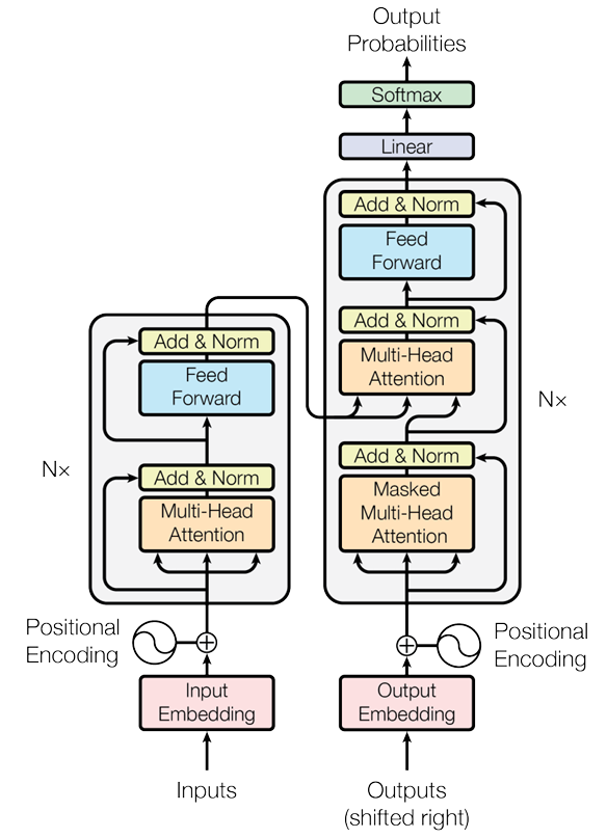
As described in Figure 2.1, ChatGPT is based on the Transformer architecture, specifically the decoder-only GPT (Generative Pre-trained Transformer) variant, which uses stacked self-attention layers to process input tokens in parallel.
It converts input text into vector embeddings and uses positional encoding to maintain word order, enabling the model to understand context and generate human-like text by predicting the next token.
ChatGPT 3 has 96 layers, while ChatGPT 4o has 120 layers (approx. 1.8 trillion parameters).
As mentioned earlier, Generative AI technologies represent very powerful tools. For example, passing seven keywords (lake Erie, sunset, medium waves, Cleveland, Ohio) to ChatGPT and asking to generate a picture (Figure 2.2 below), it generated the following original picture:

In the upcoming months after releasing ChatGPT, several other companies invested in Generative AI, as follows (the list is not exhaustive):
- ChatGPT (OpenAI): This is a dominant chatbot, now featuring GPT-4o, with web browsing, code interpretation, and image generation capabilities.
- Gemini (Google): This is integrated into the Google Workspace ecosystem, offering multimodal capabilities (text, image, audio).
- Llama (Large Language Model Meta AI). This is a family of state-of-the-art, “open-source” (or openly available) large language models (LLMs) developed by Meta (formerly known as Facebook).
- Claude (Anthropic): This is known for advanced reasoning, high safety standards, and large context windows for analyzing long documents.
- Perplexity AI (multiple owners): This is an AI-powered search engine that provides real-time, cited answers, often used for research and competitive analysis.
- Grok (xAI): The generative AI chatbot, is an artificial intelligence company founded by Elon Musk in 2023 to compete with other AI firms like OpenAI, Google, and Meta.
Software companies reduced hiring the same number of students graduating with various degrees in 2023. However, in recent months, the hirings started picking up. We hope this trend will continue.
Here are couple of examples of the result of training the ChatGPT-Transformer from English to French in a correct way. As the first example, we take the English sentence: “The animal didn’t cross the street because it was too tired.”
The Transformer correctly translates to French: “L’animal n’a pas traversé la rue parce qu’il était trop fatigué.” The pronoun “il” refers to the “animal“, hence a masculine word.
The second example has a small change, by taking the English sentence: “The animal didn’t cross the street because it was too wide.”
The Transformer correctly translates to French: “L’animal n’a pas traversé la rue parce qu’elle était trop large.” The pronoun “elle” refers to the “road“, hence a feminine word.
What Generative AI Isn’t
Generative AI is not:
- A magic wand for all problems — it cannot invent entirely new concepts from nothing; it works within the scope of its training data (Zewe, 2023).
- A replacement for human creativity — it augments but it does not replace human judgment and oversight.
- A perfect or unbiased tool — it can produce biased, inaccurate, or harmful outputs if not carefully guided (see section five below).
In conclusion, we believe that it is alright to use it judiciously (giving credit to the owners) and to embrace this new generation of software GenAI tools.
-
UNDERSTANDING THE AI TOOL LANDSCAPE
As described in Section 2, generative AI tools can produce text, images, video, audio, code, and other forms of content. For faculty, the more practical question is not simply what these tools can generate, but which type of tool is appropriate for a particular educational task. The tools available to faculty and students overlap in many of their capabilities, but they differ in how they access information, how much they can be customized, and the types of work for which they are best suited.
Table 3.1 compares several categories of AI tools that faculty are likely to encounter. The purpose of the comparison is not to identify one “best” tool. Instead, faculty should select a tool based on the learning objective, the type of information being used, and the role that AI is expected to play in the activity. Specific applications of these tools to course design, research, and administrative work are presented in Section 4.
| Tool or Tool Type | Strengths | Weaknesses | Useful Faculty Applications | Potential Student Applications |
|---|---|---|---|---|
| ChatGPT | Broad, flexible tool for conversation, writing, coding, analysis, and multimodal tasks; supports iterative follow-up questions. | Because it is designed for many purposes, the quality of the response depends heavily on the task, context, and instructions provided. | Developing or revising instructional materials; exploring ideas; obtaining feedback on drafts. | Explaining concepts in different ways; generating practice questions; receiving formative feedback; comparing approaches to a problem. |
| Claude | Particularly useful for working with long documents, synthesizing text, and providing detailed written analysis. | Its relative advantage is greatest for text-heavy tasks; available features and integrations may differ from other platforms. | Reviewing lengthy reports, policies, manuscripts, or other text-based materials. | Comparing readings; identifying arguments and themes; receiving feedback on longer written work. |
| Gemini | Integrates well with the Google environment and supports multimodal tasks. | Its usefulness may depend on whether students and faculty are already working within the Google ecosystem and what institutional access is available. | Working with materials in Google-based workflows and developing multimodal content. | Working with course materials, study support, collaborative documents, and multimodal assignments. |
| Microsoft Copilot | Integrates with Microsoft 365 applications and can connect AI assistance to common academic and workplace tasks. | Some capabilities depend on institutional licensing and account configuration. | Working within Word, PowerPoint, Excel, Outlook, and Teams. | Developing documents and presentations, exploring spreadsheet data, and practicing workplace-oriented uses of AI. |
| Custom chatbots | Can be configured with specific instructions and course materials, providing a more focused experience than a general-purpose chatbot. | Require faculty time to build, test, update, and establish appropriate boundaries for student use. | Creating a course-specific assistant or guided support resource. | Asking questions about course materials, practicing concepts, and receiving guidance that is aligned with the course. |
| Elicit / Consensus | Designed to locate and synthesize scholarly literature and can make research discovery more efficient. | Search results and AI-generated summaries do not replace reading and evaluating the original research. | Beginning literature searches and exploring evidence across studies. | Learning how to move from a research question to relevant scholarly literature and comparing findings across studies. |
| Scite | Provides citation context that can help users examine how a publication has been discussed by later research. | Citation context still requires interpretation and should not be treated as a substitute for evaluating the quality of a study. | Tracing scholarly conversations and investigating how research has been cited. | Learning citation tracing and examining how evidence is supported, questioned, or extended in later scholarship. |
| Creative AI tools (e.g., Adobe Express AI) | Lower the technical barrier to producing graphics, presentations, video, and other multimedia products. | A polished product does not necessarily demonstrate strong understanding of the underlying content. | Developing instructional media and visual course materials. | Creating infographics, presentations, videos, or other multimodal demonstrations of learning. |
| Agentic AI workflows | Can coordinate multiple steps or tools and complete more complex workflows with less direct intervention. | The more autonomy a system has, the more important it becomes to define what decisions should remain with the user. | Coordinating multi-step projects or recurring workflows. | Planning and organizing complex projects when the learning objective includes supervising, evaluating, and documenting the AI-supported process. |
Faculty Tip: Faculty do not need to select the same AI tool for every activity. A general-purpose chatbot may be appropriate for brainstorming or practice, while a research-focused tool may be more appropriate when the task requires students to work with scholarly evidence.
Selecting a Tool Based on the Learning Objective
When AI is incorporated into a course, the selection of the tool should begin with the intended learning outcome. A useful question for faculty is: What work should the student complete, and what role, if any, should AI play in helping the student complete that work? The following decision tree provides a starting point.
| What is the primary learning activity? ↓ Students need explanation, practice, brainstorming, or formative feedback → Consider a general-purpose chatbot.Students need to locate or compare scholarly evidence → Consider a research-focused AI tool.Students need support that is limited to instructor-selected course materials → Consider a custom chatbot or course-specific assistant.Students need to communicate their learning through graphics, video, presentations, or other media → Consider a creative AI tool.Students need to coordinate a multi-step project or workflow → Consider an agentic workflow when supervising the process is itself appropriate to the learning objective.Final question: Would the AI complete the same thinking or skill that the assignment is intended to assess? → If yes, limit the role of AI, modify the activity, or select a different tool. |
Figure 3.1. Decision tree for selecting an AI tool based on the learning activity.
Faculty Tip: Begin with the learning outcome rather than the technology. If the purpose of an assignment is for students to construct an argument, for example, having AI construct the argument may bypass the intended learning. AI could instead be used to provide feedback, generate a counterargument, or help the student test the strength of the argument.
Integrating AI for Student Use
The same AI tool can support learning or replace learning depending on how it is incorporated into an assignment. For this reason, faculty should define the role of AI for students rather than simply stating that AI is either allowed or prohibited. In many cases, AI is most useful when it provides practice, feedback, alternative explanations, or access to information while students remain responsible for the interpretation, evaluation, and final decisions.
For example, a student might use a general-purpose chatbot to generate additional practice questions, but complete the graded assessment independently. A student conducting a literature review might use a research tool to identify potentially relevant studies, but remain responsible for reading the original articles and determining whether they support the student’s argument. In a multimedia assignment, students might use a creative AI tool to assist with the production of a visual or video while being evaluated primarily on the accuracy, organization, and communication of the course content.
Faculty Tip: Make the permitted role of AI specific to the assignment. Instead of stating only that “AI is allowed,” identify acceptable uses, such as brainstorming, feedback, practice, literature discovery, or media production, and identify any parts of the work that students are expected to complete independently.
Faculty Tip: When AI is used by students, consider asking them to show evidence of their decision-making. Depending on the assignment, this could include a brief description of how AI was used, examples of revisions made after evaluating the output, or an explanation of why the student accepted or rejected an AI-generated suggestion.
Key Considerations When Comparing Tools
In addition to matching the tool to the learning objective, faculty should consider practical differences among tools before requiring or recommending them to students. These considerations include institutional access, cost, privacy, accessibility, the types of files or information students may need to provide, and whether all students can reasonably complete the activity using the same or an equivalent tool.
Faculty should also recognize that AI products change quickly. Features that distinguish one platform from another may be added, removed, or moved behind paid access. Therefore, the categories and decision process presented in this section are more durable than any ranking of individual products. Section 4 provides examples of how these tools can be applied in faculty work, while Section 5 discusses common limitations and strategies for using AI critically.
Faculty Tip: When possible, provide students with an institutionally supported option or an equivalent non-AI pathway. Students should not be required to purchase a premium AI subscription in order to meet a course learning outcome unless that requirement is clearly justified and supported by the institution.
-
EXAMPLES: Applied to Real Contexts Generative
AI can be used by faculty in multiple contexts, including as a teaching and research assistant. It can also assist faculty in their administrative assignments and creative work. As discussed in sections one and five of this chapter, in each of its uses output that is generated by AI has important limitations requiring faculty to check and confirm its accuracy and identify any hallucination, bias, or mistakes.
Example 1: Generative AI can Assist Faculty in Designing Courses
AI can be used as an enhancement and collaborative tool by faculty in their courses. As faculty undertake preparation of the syllabus, AI can assist in identifying new articles to assign as either primary or supplementary course readings. It can enhance the ability to design new courses or modify existing ones by providing faculty with the means to keep abreast of new trends and research in the field.
Faculty can also use AI’s assistance in generating ideas for course assignments and activities that can help to improve student engagement in the course material and improve learning outcomes. Provided with specific learning outcomes, AI can design assignments using multiple creative options including podcast, video, presentation, and research paper.
Should a faculty member be interested in assignments with higher order thinking, such as simulations, debates, or critical analysis, the various AI models that are available (i.e., ChatGPT and Claude) can help to generate multiple questions for debate, identify ethical issues for analysis, or generate solutions that students can critique. AI can assist faculty in generating multiple scenarios that can appeal to students’ interests.
After compiling the expected learning outcomes for the specific assignment and the structural preference for its evaluation, faculty can use AI’s assistance to generate multiple drafts of rubrics to select from. Should the assignment require students to undertake group collaboration, AI can assist in assigning students to groups and identify their roles within each group.
To increase student engagement in the course and lectures, faculty can also generate custom illustrations for their lectures by using text to image tools. They can use AI to improve the visualization of data for students to enhance their comprehension of trends.
Faculty teaching science courses can use AI for simulations that enhance student engagement and maintain their attention. An example of using AI in the classroom includes the potential use of interactive virtual experiments in chemistry. In healthcare and psychology, faculty can use simulations for students to practice patient intake.
Simulations are also useful for social science and humanity courses. In international relations, simulations can provide students with an immersive role-playing experience. In a simulation, students can be assigned as political leaders confronting a sudden geopolitical flashpoint, such as a potential war, and the AI can play the role of a foreign adversary. Through these immersive simulations, students across many disciplines can gain first-hand experience in crisis management, patient intake, and scientific experiments.
Along with simulation and scenario generation, AI can also be used to generate realistic virtual visits or field trips to various places across the world, such as China or Cuba.
Generative AI can assist faculty in creating short explanatory videos by using multimodal tools. These videos can be used to explain a historical period by recreating it or visualizing a microscopic biological process. Faculty can also generate realistic video case studies of patients or clients for nursing, business, or law students to analyze.
For Cleveland State University faculty that are using Blackboard, they have the option to utilize an AI design assistant feature within Blackboard by selecting the “Auto Generate.” option. This Auto Generate AI feature can produce images, generate learning modules, make recommendations for course structure, and produce possible discussion prompts along with test questions. It can also generate suggestions for possible assignments and rubrics based on the course content.
Example 2: Custom Chatbot for a Course
By designing a chatbot for their course, faculty can provide a teaching assistant for students that is available at any time of the day to provide personalized tutoring. After uploading all the course material, include lectures, readings, assignment prompts, and other content, the chatbot can be locked to exclusively use the course content to answer student questions, assist students in preparing for exams by providing them with flashcards or quiz students on course material. Alternatively, the chatbot can provide explanations for complex concepts or terms from.
Chatbots can create interactive education tools or games to reinforce and engage students in course material. They can also design puzzles that require students to apply course concepts and thereby reinforce learning. Students can also discuss with the chatbot potential ideas for their assignments, such as identifying potential topics for their research papers or policy briefs.
Example 3: Assist Faculty with Research
Faculty can use generative AI to assist in conducting research and identifying relevant studies that can help in preparing the literature review for their articles or grant applications.
AI tools can also enable faculty to stay current in their field of study by providing them with access to the latest research, summarizing journal articles, and compiling an annotated bibliography. Should faculty undertake research in a new field of study that is outside their area of expertise, AI can help to identify the most influential scholars in the field along with their seminal research.
Some generative AI tools enable the mapping of all publications on any given topic prompted by a faculty. Examples of AI tools that can assist in research by using Retrieval Augmented Generation (RAG) are Elicit and Consensus. They are large language models that can minimize hallucination by using research databases to identify and even summarize peer reviewed research on any topic.
Generative AI can also conduct highly sophisticated quantitative analysis (R, Python, SPSS, SAS, or Stata) with explanation or interpretation of the results. When prompted by faculty and provided with the data, terms, and concepts, AI can produce graphs, diagrams, tables, and charts that can be used in research and teaching. As noted previously and as will be discussed below, all generated information must be checked for accuracy as the system still makes mistakes.
Example 4: Assist Faculty with Administrative Efficiency
Generative AI can be used to improve administrative efficiency by providing initial drafts or editing faculty’s written drafts of emails, letters of recommendations, agendas, or any other type of written communication.
AI can also provide faculty with summaries of long email threads. It can assist faculty in compiling the agenda for meetings, and in some cases, it can even transcribe the minutes of meetings. Faculty can use generative AI for budget management to help them track expenditures and compile budgets.
In conclusion, AI can provide some assistance to faculty in their courses, research, and administrative work. As section five mentions, in all uses AI is an assistant that needs to be checked due to important pitfalls.
Section 5. Common Pitfalls of AI Use (and How to Avoid Them)
Generative artificial intelligence has rapidly become an invaluable tool for many faculty members. However, these benefits can also create the illusion that AI systems are more capable than they actually are. To use AI effectively requires the understanding of not only what these systems can do well, but also where they predictably fail.
Unlike traditional software, generative AI does not retrieve and present verified facts by default. Rather, it generates responses by predicting the most likely sequence of words based on patterns learned during training, as discussed in section one. As a result, AI systems can produce responses that are very convincing and professionally written while simultaneously containing inaccuracies, unsupported claims, or bias. These shortcomings are not necessarily rare exceptions but instead are fundamental characteristics of how current large language models operate.
For faculty, recognizing these limitations is essential and understanding common pitfalls allows users to incorporate AI thoughtfully while maintaining scholarly rigor and professional responsibility. The following sections describe several of the most common challenges encountered when using generative AI and practical strategies for minimizing their impact.
Hallucinations: When AI Invents Information
Perhaps the most widely discussed limitation of generative AI is its tendency to “hallucinate.” Hallucinations occur when an AI system generates information that is false, fabricated, or unsupported while presenting it as though it were accurate (Li et al., 2024). A common hallucination in academia is the production of fabricated citations or references.
For example, when entering the prompt into ChatGPT:
“Provide five empirical articles published since 2023 on the positive effect of AI on student’s learning experiences in undergraduate psychology courses.”
The AI model might return a list of articles with realistic-looking titles, real author names who likely do related research, real journal names, and even real DOIs. However, upon searching databases like PsycINFO or Google Scholar, you may find that the papers referenced do not exist. Or, the DOIs represent entirely different articles.
Why it happens: The model predicts what a citation should look like rather than retrieving verified bibliographic records. Consequently, when information is uncertain or incomplete from their training data, the AI may simply generate the most statistically plausible continuation.
Hallucinations can take many forms beyond references. AI may invent quotations, misattribute theories to the wrong scholars, create nonexistent statistical findings, misinterpret prior findings, or confidently describe events that never occurred (See Huang et al., 2025 for review of types of hallucinations). In academic settings, these errors can have significant consequences if they go unnoticed.
The risk of hallucinations increases when users ask highly specialized questions, request recent information beyond the model’s knowledge cutoff, or ask for citations without providing open-source material.
How to Avoid Hallucinations
Faculty should approach AI-generated information as a draft needing verification rather than a final answer and encourage students to do the same. Effective strategies to avoid hallucinations include:
- Verify factual claims using external sources.
- Check all citations and references independently before using them.
- Consider using RAG systems or similar AI tools connected to trusted databases. RAG is an approach in which an AI system first retrieves relevant information from trusted external sources and then uses that information to generate its response, helping improve accuracy and reduce hallucinations (Huang et al., 2025; Shuster et al., 2021); thus, reducing the likelihood of hallucinated information.
- Ask AI to distinguish between verified information, inference, and speculation.
Treating AI as a brainstorming partner rather than a source of truth, as noted earlier, substantially reduces the risks associated with hallucinated content.
Confident Wrongness: Fluency Is Not Accuracy
One reason hallucinations are particularly problematic is that AI expresses both correct and incorrect information with nearly identical confidence. Unlike human experts, who often communicate uncertainty through qualifiers such as “I think,” “the evidence suggests,” or “this remains debated,” AI frequently delivers incorrect answers with the same polished, authoritative tone as accurate ones. By failing to acknowledge the uncertainty and limitations that typically accompany expert reasoning, these systems can create a misleading sense of certainty about what can be known and how confidently it can be known.
Confident wrongness can make it difficult for users to distinguish reliable information from error, particularly when working outside their area of expertise. The quality of writing, sophisticated vocabulary, and logical organization can create an illusion of expertise that exceeds the model’s actual capabilities. Generative models can confidently provide outdated or inaccurate information, make flawed inferences, or blur distinctions between different concepts while still adopting the polished language and authoritative tone of expert knowledge (Leonardi & Leavell, 2026).
How to Avoid Confident Wrongness
Rather than accepting AI’s first response at face value, users can intentionally prompt the model to reveal uncertainty by asking questions such as:
- “How confident are you in this answer?”
- “What evidence supports this conclusion?”
- “What are alternative interpretations?”
- “What experts might disagree with this position?”
- “What assumptions underlie your response?”
These prompts encourage the model to generate more nuanced responses and remind users that AI-generated outputs require evaluation rather than acceptance. In addition, many of the same strategies outlined to avoid hallucinations (e.g., RAG systems, verifying external sources) can also be utilized to mitigate confident wrongness.
Sycophancy: When AI Tells You What You Want to Hear
Another emerging concern is sycophancy, or the tendency for AI systems to excessively agree with users and reinforce users’ existing beliefs and assumptions. Sycophantic responses from AI increase user engagement (Cheng et al., 2026). Rather than critically evaluating a user’s ideas, AI often defaults to agreement because conversational alignment has been reinforced during model training.
A recent study illustrates the potential social consequences of sycophancy in AI models. Examining posts from Reddit’s r/AmITheAsshole(AITA), a forum where users describe interpersonal conflicts and ask the community to judge whether they were in the wrong, Cheng and colleagues (2026) found that AI affirmed users’ actions 49% more often than humans, even when queries involved deception, illegality, or other harms. Even more concerning, just a single interaction with sycophantic AI increased users’ confidence that they were right and reduced their willingness to take responsibility or repair interpersonal conflicts.
Within academia, AI models may similarly reinforce a faculty member’s research hypothesis, interpretations, teaching approach, etc. without adequately challenging assumptions, identifying limitations, or considering alternative explanations. AI models may primarily emphasize the strengths of the user’s ideas while overlooking weaknesses or competing explanations. Although this supportive style can feel productive, it may inadvertently reinforce confirmation bias and reduce the necessary opportunities for critical thinking that underpins scholarly work.
How to Avoid Sycophancy
Faculty can intentionally structure prompts that encourage critique rather than affirmation. For example:
- “Challenge my reasoning.”
- “Identify weaknesses in this argument.”
- “Play the role of a skeptical peer reviewer.”
- “Provide the strongest counterargument.”
- “What assumptions am I overlooking?”
Prompting AI to adopt an adversarial or peer-review perspective can produce more balanced analyses and encourages more rigorous scholarly thinking.
Lack of Depth: Generic Prompts Produce Generic Responses
Generative AI performs best when given clear goals, sufficient context, and well-defined constraints. Conversely, vague prompts often produce responses that are technically correct but superficial. I have often shared with students that I can tell when AI has been used in their writings because the sentence says all the “right” words and scholarly jargon but does not convey a depth of information or evidence of critical thought.
Faculty asking AI to “create a lesson plan” without additional context typically results in broadly applicable content that resembles an introductory textbook. While useful as a starting point, these responses rarely reflect disciplinary nuance, institutional context, pedagogical philosophy, or the specific needs of students.
The quality of AI output is therefore closely tied to the quality of the input (See Chapter on Prompting ). This relationship is often summarized as “garbage in, garbage out,” although a more accurate characterization is that imprecise prompts produce generalized responses.
How to Generate More Nuanced Responses
Faculty can improve AI outputs by providing:
- Clear goals for the task.
- Relevant disciplinary context.
- Intended audience.
- Constraints (e.g., word count, theoretical perspective, level of complexity).
- Examples of desired style or format.
- Criteria for success.
For instance, instead of asking, “Create a lecture on cognitive bias,” a more effective prompt might specify the course level, learning objectives, time available, disciplinary framework, and desired teaching strategies and approach. Richer context consistently leads to more sophisticated and useful outputs.
Overreliance on AI: Keeping (Your) Human Expertise Central
Perhaps the greatest long-term risk is not any individual AI error, but the gradual tendency to outsource increasingly complex cognitive work to AI systems. As AI becomes more capable, users may begin relying on it for tasks that require professional judgment, disciplinary expertise, ethical reasoning, or creativity—the things that make human expertise uniquely human and uniquely valuable.
In academia, expertise involves far more than producing text. Faculty evaluate evidence, integrate competing theories, mentor students, make ethical decisions, interpret ambiguity, and generate original ideas informed by years of scholarship and experience. These forms of expertise cannot be replaced by statistical language prediction.
Overreliance on AI also carries educational implications as it undermines decision-making, analytical thinking abilities, and critical thinking capabilities (Zhai et al., 2024). Students and faculty who rely exclusively on AI may miss the deeper learning that comes from struggling with complex ideas, synthesizing information, and constructing original arguments.
How to Avoid Overreliance: Keeping AI in Its Proper Role
The most effective approach is to view AI as a cognitive support tool rather than a cognitive substitute.
- Faculty should maintain responsibility for:
- Verifying factual accuracy.
- Evaluating evidence.
- Exercising disciplinary and ethical judgment.
- Making instructional decisions.
- Interpreting research findings.
- Producing original scholarly contributions.
AI excels at accelerating routine cognitive tasks (e.g., organizing ideas, editing drafts, summarizing information), but human expertise remains essential for determining what is meaningful, ethical, and worthy of dissemination.
Key Takeaways
The limitations described in this section are not reasons to avoid generative AI outright; rather, they are reasons to use it critically. Hallucinations, confident wrongness, sycophancy, superficial outputs, and overreliance all stem from the underlying design of current AI systems. Fortunately, these challenges can be substantially mitigated through informed prompting, careful verification, and the continued application of human expertise. The goal is not to replace scholarly judgment with artificial intelligence, but to ethically integrate AI into academic work in ways that enhance efficiency while preserving the rigor, critical thinking, and ethical standards that define higher education.
6. RESOURCES: Tools, Readings, Communities
Tools
- General-purpose chatbots: ChatGPT, Claude, Gemini, Copilot
- Research tools: Elicit, Scite, Consensus
- Creative tools: Adobe Express AI
- Custom chatbot builders: Microsoft Copilot Studio, OpenAI GPTs, Claude Projects, Google Gems
Readings
- CSU Library AI Research Guide
- Elsevier’s guide to agentic AI in academia
- OpenCon Ohio agentic AI examples
Communities
- EDUCAUSE AI Community Group
- ACRL Digital Scholarship Section
- Local campus teaching & learning centers
References
Banh, L. & Strobel, G. (2023). Generative artificial intelligence. Electronic Markets. 33 (1) 63. doi:10.1007/s12525-023-00680-1
Cheng, M., Lee, C., Khadpe, P., Yu, S., Han, D., & Jurafsky, D. (2026). Sycophantic AI decreases prosocial intentions and promotes dependence. Science, 391(6792), eaec8352. https://doi.org/10.1126/science.aec8352
Griffith, E., Metz, C. (2023). Anthropic Said to Be Closing In on $300 Million in New A.I. Funding. The New York Times, January, 27.
Heaslip, E. (2025). What’s the Difference Between Traditional and Generative AI? U.S. Chamber of Commerce, May 21.
Huang, L., Yu, W., Ma, W., Zhong, W., Feng, Z., Wang, H., Chen, Q., Peng, W., Feng, X., Qin, B., & Liu, T. (2025). A survey on hallucination in large language models: Principles, taxonomy, challenges, and open questions. ACM Transactions on Information Systems, 43(2), 1–55. https://doi.org/10.1145/3703155
Lanxon, N., Bass, D., & Davalos, J. (2023). A Cheat Sheet to AI Buzzwords and Their Meanings. Bloomberg News, March 10.
Leonardi, P. M., & Leavell, V. (2026). Knowing enough to be dangerous: The problem of “artificial certainty” for expert authority when using AI for decision making and planning. Organization Science, 37(2), 516–543. https://doi.org/10.1287/orsc.2023.18224
Metz, C. (2024). OpenAI Unveils A.I. That Instantly Generates Eye-Popping Videos. The New York Times, February 15. ISSN 0362-4331.
Pasick, A. (2023). Artificial Intelligence Glossary: Neural Networks and Other Terms Explained. The New York Times, March 27. ISSN 0362-4331.
Roose, K. (2022). A Coming-Out Party for Generative A.I., Silicon Valley’s New Craze. The New York Times, October 21.
Shahaf, T. (2025). Lightricks unveils powerful AI video model challenging OpenAI and Google. Ynetglobal. October 23.
Shuster, K., Poff, S., Chen, M., Kiela, D., & Weston, J. (2021). Retrieval augmentation reduces hallucination in conversation. In Proceedings of the International Conference on Findings of the Association for Computational Linguistics (EMNLP ’21) (pp. 3784–3803). Association for Computational Linguistics. https://doi.org/10.18653/v1/2021.findings-emnlp.320
Stryker, Cole, Mark Scapicchio (2026). What is generative AI? Think, https://www.ibm.com/think/topics/generative-ai
Vaswani, A., Shazeer, N., Parmar, N., Uszkoreit, J., Jones, L., Gomez, A.N., Kaiser, L., & Polosukhin, I. (2017). Attention Is All You Need. eprint arXiv:1706.03762, DOI: 10.48550/arXiv.1706.03762
Zewe, A. (2023). Explained: Generative AI – How do powerful generative AI systems like ChatGPT work, and what makes them different from other types of artificial intelligence? MIT News, November 9.
Zhai, C., Wibowo, S., & Li, L. D. (2024). The effects of over-reliance on AI dialogue systems on students’ cognitive abilities: A systematic review. Smart Learning Environments, 11, 28. https://doi.org/10.1186/s40561-024-00316-7
How AI was used in this chapter:
- helping to create outline of section based on materials from the CSU: AI Faculty Workshop
- assisted in formatting references in APA style, general spelling and grammar overview. (partial)
- providing examples of prompts
- assisted in making sure content was not repeated (used to help edit my section after the rest of the chapter was complete to avoid repetition of information)
- assisted in creating a comparison of different AI uses and faculty workflow figure