Main Body
11 CH 11 – IST
INTRODUCTION
Information Systems
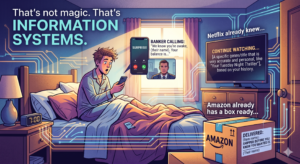
You checked your phone this morning. Your bank already knew you woke up. Netflix already knew what you’d watch tonight. Amazon already has a box ready to ship before you even know you want it. That’s not magic. That’s information systems.
The jobs you will have in five or ten years will rely even more on data, technology, and systems than they do today. Understanding information systems now is not about becoming a tech expert. It is about being ready for the future of business.
Information systems turn data into decisions.
And in business, better decisions win.
CHAPTER OUTLINE
11.1: What Is an Information System?
11.2: Types of Information Systems
11.3: Data vs. Information vs. Knowledge
11.4: Hardware and Software Basics
11.5: Networks
11.6: Databases
11.7: Cybersecurity and Privacy
11.8: Ethical and Social Issues in IS
11.9: IS in the Real World
11.1 What is an Information System?
An information system (IS) is a combination of hardware, software, data, people, and processes that work together to collect, store, and share information. It’s not just a computer. It’s the whole setup that helps people and organizations make decisions and get things done.
Every business you interact with runs on information systems. When you order from DoorDash, swipe your debit card, or register for classes at school, an information system is working behind the scenes to make that happen.
IS vs. Just “Computers”
A lot of people hear “information systems” and think it just means computers. But IS is bigger than that. A computer is a piece of hardware. An information system includes the software running on it, the data being stored, the people using it, and the rules for how it all works together.
Underestimating the “System” part of Information Systems
Consider the story of Knight Capital Group.
Before 2012, Knight Capital was a titan on Wall Street. They were a “Market Maker,” meaning they provided liquidity by constantly buying and selling stocks. They handled about 10% of all U.S. equity trading and were the largest trader in the U.S., moving billions of dollars every single day. They were a “high-frequency trading” firm, relying on incredibly fast Information Systems to make tiny profits on millions of trades.
In July 2012, Knight was preparing for a new program at the New York Stock Exchange. They updated their software on 7 out of their 8 servers. A technician forgot to update the 8th server. That server still had a piece of “dead code” from 2003 – a test program called “Power Peg” that had been dormant for nine years.
When the market opened at 9:30 AM on August 1st, the system sent orders to that 8th server. The “zombie code” woke up and began buying stocks high and selling them low, thousands of times per second.
It executed 40 trades per second across 154 different stocks.
When engineers realized something was wrong, they tried to “roll back” the software to the old version. This actually made it worse because it reactivated the zombie code on all the servers.
By the time they physically shut the system down 45 minutes later, they had lost $440 million (nearly $10 million per minute!) It wiped out the company’s equity in under an hour.
They went bankrupt shortly after.

The Lesson
An Information System is only as good as its implementation and maintenance.
In a modern business, your Information System IS your business. If the system isn’t managed with rigorous checks, balances, and “kill switches,” the business can be destroyed before a human manager even has time to finish their morning coffee.
*Fun Fact: Because of this event, the SEC (Securities and Exchange Commission) passed the “Market Access Rule,” which basically legally requires firms to have “kill switches” to prevent algorithms from going rogue.
11.2 Types of Information Systems
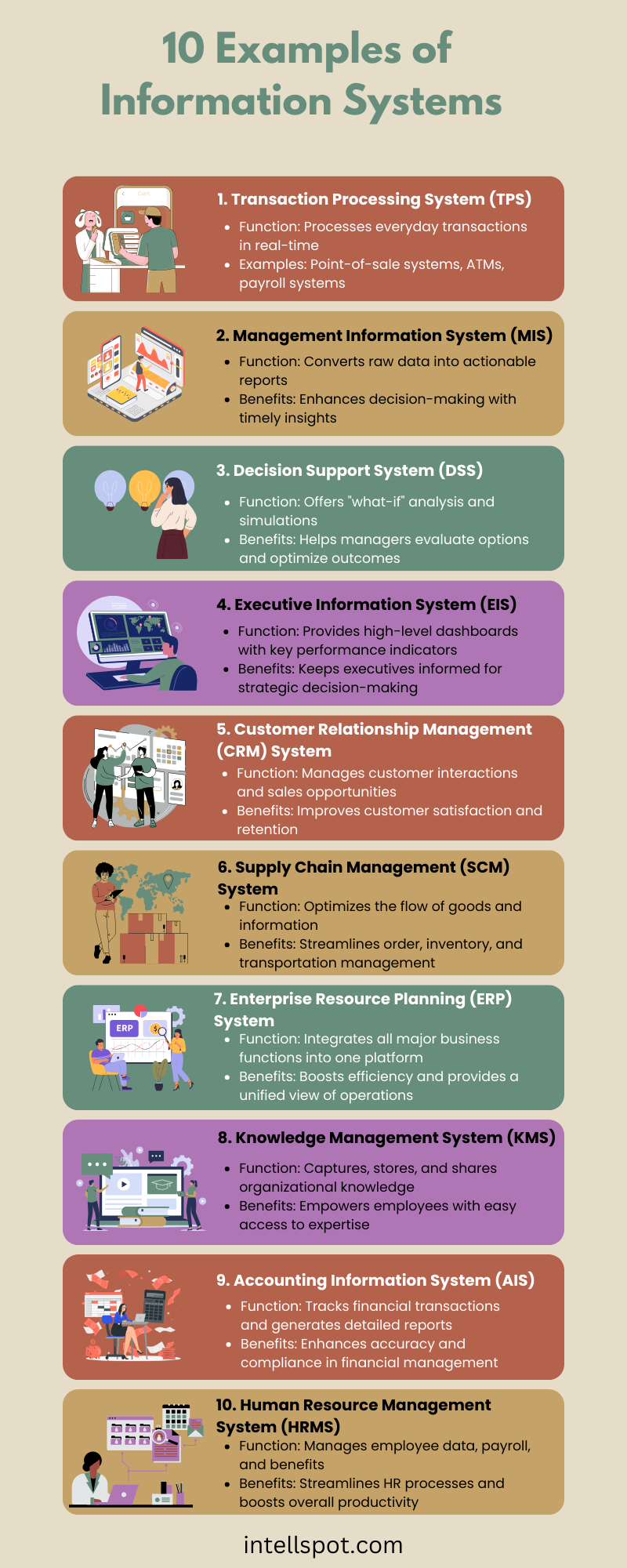
Not all information systems do the same job. Different types of IS are built for different levels of a business and different kinds of decisions.
- Transaction Processing Systems (TPS): These handle the day-to-day stuff. Every time someone swipes a card at Target, places an order on Amazon, or checks in at a hotel, a TPS records that transaction. Speed and accuracy are everything here.
- Management Information Systems (MIS): These pull data from TPS and turn it into reports that managers can use. Instead of looking at every individual sale, an MIS shows you total sales by region, by week, or by product. It’s about summarizing data so managers can see what’s going on.
- Decision Support Systems (DSS): These help people make more complex decisions. A DSS might help a hospital figure out staffing needs based on patient volume trends, or help a retailer decide how much inventory to order based on seasonal patterns.
- Executive Information Systems (EIS): These are designed for top-level leaders who need a big-picture view. Think dashboards with key metrics, charts, and summaries. A CEO doesn’t need to see every individual transaction. They need to know: is the company growing? Where are we losing money?
Here are some more types:
11.3 Data vs. Information vs. Knowledge
These three words get used interchangeably all the time, but in information systems they actually mean different things.
Data: Raw, unprocessed facts. “10,000” or “Tuesday” or “68 degrees” are data points. On their own, they mean nothing.
Information: Data that has been processed and given context. “10,000 people attended the concert on Tuesday when the temperature was 68 degrees” is information.
Knowledge: What you do with information. “Outdoor concerts do best on mild weekday evenings. We should schedule more of them.” That’s knowledge.
Businesses collect enormous amounts of data every day. The challenge is turning that data into information, and then into knowledge that actually helps them make better decisions.
IRL EXAMPLE
11.4 Hardware and Software Basics
Every information system runs on a foundation of hardware and software. You don’t need to be a tech person to understand the basics.
Hardware
Hardware is any physical component of a computer system. It breaks down into four functions:
- Input: Getting data into the system. Keyboards, touchscreens, cameras, and microphones are all input devices.
- Processing: The CPU (processor) takes that input and does something with it.
- Output: Showing or delivering the result. Your screen, speakers, and printer are output devices.
- Storage: Saving data for later. Hard drives, SSDs, and flash drives are storage devices.
Software
Software is the set of instructions that tells hardware what to do. There are two main categories:
- System software: Runs the machine itself. Windows, macOS, and iOS are operating systems.
- Application software: Runs specific tasks. Instagram, Excel, and Chrome are all applications.
EXAMPLE: THE CLOUD
You’ve probably used the cloud without thinking about it. iCloud, Google Drive, and OneDrive are all cloud storage. Instead of saving files on your device, you’re saving them on servers somewhere else that you access over the internet.
For businesses, the cloud is huge. It means they don’t have to buy and maintain physical servers. They can scale up or down as needed and access their data from anywhere.
Cloud Computing: The Good and the Bad
More and more companies are moving to cloud computing, and it is easy to see why. It saves money on physical servers, lets teams work from anywhere, and scales up or down based on what a business needs. But like any tool, it comes with real risks if it is not managed carefully.
The biggest concerns are security and data loss. When your data lives on someone else’s servers, you are trusting that their security is strong enough to protect it. Sometimes it is not.
A real example: In January 2024, over 15 million Trello accounts were leaked. Trello is a project management app that tons of companies use to organize their work. Hackers found a weakness in Trello’s public API and used it to pull user data including email addresses, full names, and usernames. Because so many businesses use Trello for team collaboration, that breach opened the door to phishing attacks and unauthorized access to sensitive company information. After the incident, Trello required authentication for API access to close the gap.
The takeaway is simple. Cloud tools are powerful and convenient, but businesses need to understand what they are signing up for. Storing sensitive data in the cloud without proper security practices is like leaving your front door unlocked because the neighborhood seems safe. It works until it does not.
11.5 Networks
A network is two or more devices connected so they can share data. Networks are what make information systems actually useful at scale.
LAN (Local Area Network): A network within a small area, like your school or a single office building. The Wi-Fi at your house is a LAN.
WAN (Wide Area Network): A network that covers a large area, like multiple office buildings across a city, or even across countries. The internet itself is the biggest WAN in the world.
Why Networks Matter for Business
Think about what a store like Walmart needs to function. Every register needs to talk to inventory systems. Inventory systems need to talk to suppliers. Suppliers need to talk to logistics teams. None of that works without a network. Connectivity is not just a convenience for businesses. It is the entire infrastructure their operations run on.
When a network goes down, business stops. That’s why network reliability and security are top priorities for IT departments.
11.6 Databases
A database is an organized collection of data that can be easily accessed, managed, and updated. Almost every information system you interact with is powered by a database.
When you log into your school’s student portal, it pulls your name, ID, schedule, and grades from a database. When you search a product on Amazon, the results come from a massive product database. When Spotify loads your library, that’s a database too.
Structured vs. Unstructured Data
- Structured data: Organized in a clear format, usually rows and columns. Think of a spreadsheet. Names, phone numbers, purchase dates. Easy to search and sort.
- Unstructured data: Doesn’t fit neatly into rows and columns. Photos, videos, emails, social media posts. This type of data is harder to analyze but makes up the majority of data in the world.
Why Databases Matter
Businesses use databases to track customers, inventory, employees, transactions, and more. A well-designed database means faster searches, fewer errors, and better decisions. A poorly designed one causes slowdowns, duplicate records, and costly mistakes.
11.7 Cybersecurity and Privacy
The more a business depends on information systems, the bigger a target it becomes. Cybersecurity is the practice of protecting systems, networks, and data from attacks.
Common Threats
- Phishing: Fake emails or messages that trick you into giving up your password or clicking a bad link. This is the most common way people get hacked (Over 90% of cyberattacks start with a phishing email! 3.4 billion are sent every day!) You’ve probably seen these in your own inbox.
- Pharming: A scam designed to steal your personal or financial information. Here is what makes it especially tricky: you do not have to click a suspicious link or make any obvious mistake. You type the correct website address into your browser, but malware already on your device quietly redirects you to a fake version of that site. The fake site looks real. You log in, enter your card number, or fill out a form, and that information goes straight to whoever set up the scam.
- *It is different from phishing because phishing tries to trick you into clicking something. Pharming works even when you do everything right. That is what makes it so dangerous.
- Malware: Malicious software designed to damage or gain access to a system. Viruses, worms, and spyware all fall under this category.
- Viruses: Software that can be spread from one computer to another without the knowledge or permission of the computer user by attaching itself to emails or other files.
- Worm: Software that, unlike viruses, can spread on its own by using well-known vulnerabilities (unsecured points) to enter computer networks without being attached to other files.
- Spyware: Software that gets installed on your device without your knowledge or permission. Once it is there, it runs quietly in the background tracking what you do, what you type, what sites you visit, and sometimes even listening through your microphone or watching through your camera. More than 30% of all mobile devices are estimated to have some form of spyware on them, and most users have no idea.
- Spyware often comes bundled with free apps, sketchy downloads, or links clicked without thinking. For businesses, spyware is a serious threat because it can capture login credentials, financial data, and internal communications without anyone noticing until the damage is done.
- Data Breaches: When hackers get into a company’s system and steal customer data. Companies like Target, Facebook, and T-Mobile have all experienced major breaches. Your personal info may have already been exposed in one.
Why Businesses Are Targets
Businesses store enormous amounts of valuable data: credit card numbers, social security numbers, health records, and login credentials. That data is worth money on the dark web. A single breach can cost a company millions of dollars in fines, lawsuits, and lost customers.
Basic Protection
- Strong passwords and two-factor authentication (2FA)
- Software updates – patches fix known vulnerabilities
- Employee training – most breaches happen because of human error, not technical failure
- Firewalls and encryption – tools that protect data in transit and at rest
11.8 Ethical and Social Issues in IS
Technology moves fast. Laws and ethics don’t always keep up. There are some serious questions about how information systems affect people and society that every business and every citizen should think about.
Data Privacy: Who Owns Your Data?
Every time you use an app, you generate data. What you click, how long you look at something, where you are. Most people agree to terms of service without reading them, which often means giving companies the right to sell that data to advertisers.
The question of who actually owns your data is still being debated. The EU passed the GDPR (2016), one of the strongest data privacy laws in the world, requiring companies to get explicit consent before collecting data. The US has been slower to catch up.
Data Protection Laws in the United States
The Digital Divide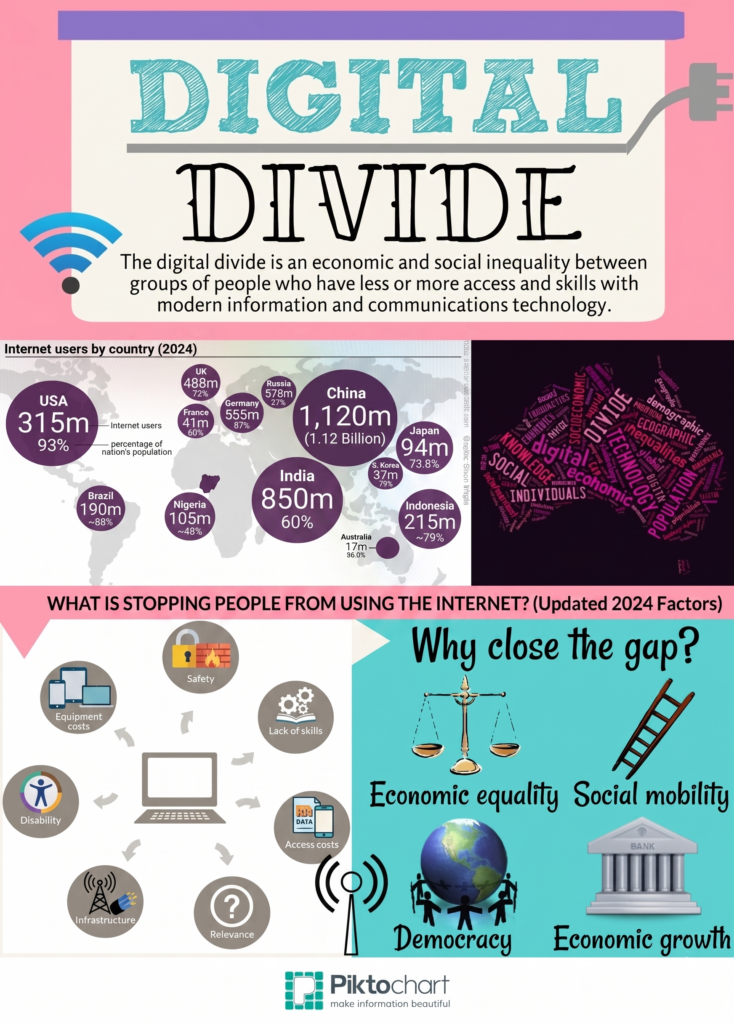
Not everyone has equal access to technology. The digital divide refers to the gap between people who have reliable access to the internet and devices and those who don’t. This gap often falls along economic and geographic lines. Rural areas, low-income households, and developing countries are disproportionately affected. In a world where more and more opportunity lives online, this is a serious equity issue.
Visual Examples of the Digital Divide.
AI and Automation
Information systems increasingly include AI that can do jobs that humans used to do. Self-checkout machines, chatbots, automated scheduling, and content recommendation algorithms are already reshaping the workforce. Some jobs are disappearing. New ones are being created. The challenge is that the new jobs often require different skills than the ones being replaced, which leaves some workers behind.
How AI & Automation are Transforming IT Operations
Workforce Change: Remote / Hybrid Work
Where work happens has changed. High-speed internet, cloud computing, video conferencing, and collaboration platforms (Microsoft Teams, Zoom, and Slack) allow millions of employees to work from almost anywhere.
Remote work offers several advantages: lower operating costs, increased flexibility, access to a larger talent pool. Employees often benefit from reduced commuting time, improved work-life balance, and greater flexibility in managing their schedules.
However, remote work also presents challenges: Managers may struggle to maintain communication, monitor productivity, and build strong team relationships. Employees can experience feelings of isolation, difficulty separating work from personal life, and “Zoom fatigue” from spending long hours in virtual meetings.
Information systems have made remote work possible, but organizations must carefully balance flexibility with collaboration, employee well-being, and organizational culture.
AI in Hiring
Many companies now use AI-powered software to screen resumes, rank applicants, analyze video interviews, and even predict which candidates are most likely to succeed. These systems can help organizations review thousands of applications quickly, reduce administrative work, and identify qualified candidates.
However, using AI in hiring also raises important ethical concerns. AI systems learn from historical data, and if that data contains bias, the AI may unintentionally favor or disadvantage certain groups of applicants. In some cases, qualified candidates may be rejected simply because their resumes don’t contain specific keywords that the software is programmed to recognize.
As a result, many experts argue that AI should support human decision-making rather than replace it entirely to make sure hiring decisions are fair, transparent, and based on the whole person rather than just an algorithm.
Did You Know? Studies estimate that more than 90% of large employers now use some form of applicant tracking system or AI-assisted screening before a human recruiter reviews many resumes.
11.9 IS in the Real World
Is Domino’s a pizza company or a software company?
-
The Reality: Domino’s has a larger percentage of employees in tech/data than in many actual “tech” firms. Their “AnyWare” system allows ordering via tweets, smartwatches, and car dashboards.
-
The Lesson: Information Systems didn’t just help Domino’s; it saved them from near-bankruptcy in 2008. It’s the difference between a local pizza shop and a $17 billion global leader.
*Information systems touch every department in a business.
Here’s how:
- Marketing: CRM software tracks customer behavior and helps marketers personalize messages. Tools like HubSpot or Salesforce are built on IS.
- Finance: Accounting software, payroll systems, and financial dashboards all rely on IS to track money in and out.
- Human Resources: HR platforms manage employee records, scheduling, performance reviews, and hiring pipelines.
- Operations: Supply chain management systems track inventory, shipments, and vendor relationships in real time.
E-Commerce and IS
Online retail runs entirely on information systems. When you buy something on Amazon, an IS processes your payment, checks inventory, assigns a warehouse, routes the shipment, sends tracking updates, and updates your purchase history. All of that happens in seconds.
Careers in Information Systems
IS is one of the fastest-growing fields in the job market.
Some paths include:
- Systems Analyst: Studies how organizations use tech and recommends improvements
- Database Administrator: Manages and secures company databases
- Cybersecurity Analyst: Protects systems from threats
- IT Project Manager: Oversees tech implementations and upgrades
- Business Intelligence Analyst: Turns data into insights for decision-makers
You don’t have to be a programmer to work in IS. Many roles focus on business strategy, communication, and problem-solving with technology as the tool.
Closing
Information systems are the backbone of every organization running today. Understanding how data moves, gets stored, and turns into decisions gives you an edge in any career you choose. You’re already living inside these systems.
Now you know how they work.
…and the individuals who understand how information flows through a business will always have an advantage over those who don’t.
EXTRA LEARNING RESOURCES